91%
DEVOUR2021 · Straight Back Games
- Инди
- онлайн-кооператив
385 ₽ Нет отзывов
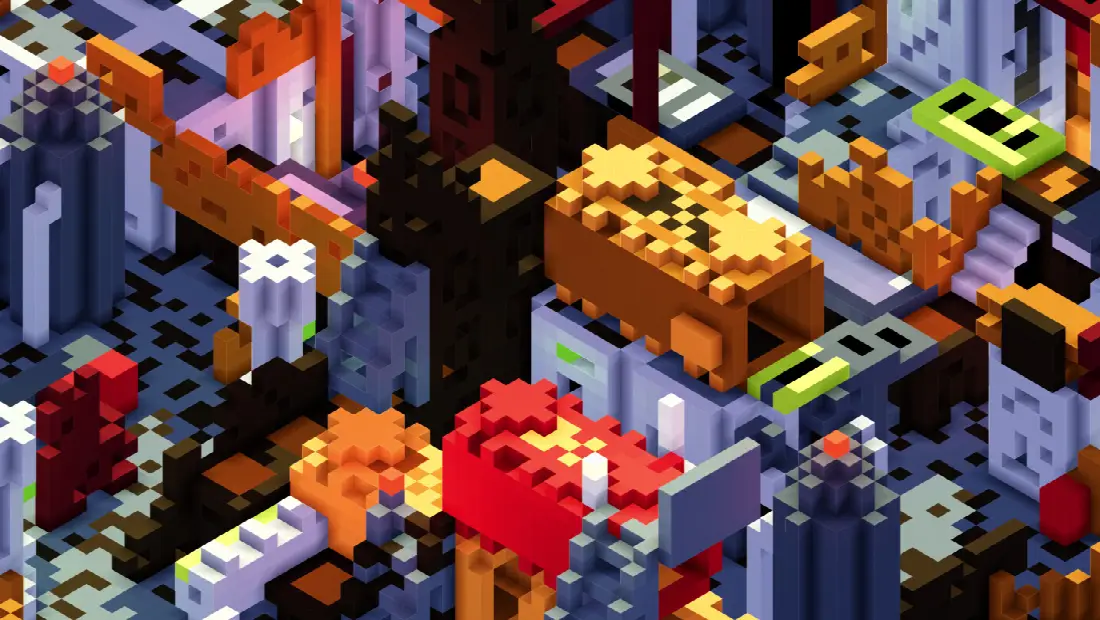


A voxel-based virtual tabletop with full 3D building, movement, and fog-of-war. Place voxels in any color with a variety of 3D shape tools like rectangles, cylinders, ramps, pyramids, etc. Import any image as custom standees. Detailed GM control over player vision, teams, dice, and more!
Сейчас −40% - дешевле за время наблюдений не было. Цены отслеживаем 1 день, поэтому минимум пока предварительный.


Картинка обновляется сама: покажет живой рейтинг игры на сегодня и ведёт на эту страницу.

A 3D voxel virtual tabletop
Terrablox is a virtual tabletop (VTT) built from the ground up in 3D. Build your map out of blocks, drop in tokens for the party and the monsters, and run your session with real line of sight, real lighting, and real fog of war. Terrablox has no rules or content of its own: you bring your own game, in any genre, at any scale.
Built in 3D from the ground up
In Terrablox the map is a true 3D world, and everything else follows from that: stairs, balconies, bridges, caves, towers and multi-floor buildings all work naturally, and sight, light, sound and rulers all respect real geometry.
• Real 3D lighting. Light is propagated through the voxel grid: a directional sun, ambient skylight, colored light, and any block can be turned into a light source (torches, lava, crystals, neon signs, screens). Tokens can carry their own lights.
• Per-scene look. Choose between normal, soft or hard cel shading, blueprint and "moonside" outline styles, plus sky, sun, horizon and ground colors, exposure, contrast, saturation, and atmospheric fog.
• Multiple cameras. Free orbit, orthographic, true isometric (with rotation snaps and several pitch presets), top-down, and first-person from any token's eyes.
• Cut plane. Slice away everything above a chosen height to see inside buildings and dungeons.
Line of sight and fog of war that actually work
Because the world is real 3D geometry, visibility "just works". A tall wall hides what is behind it. A token on a cliff sees farther. A closed door prop blocks sight until someone opens it.
• Three visibility states per team: Unexplored, Explored (remembered) and Visible. Choose per scene how dark unexplored and occluded areas should be (none, partial or full fog), and whether tokens may move only into visible areas, into explored areas, or anywhere.
• Per-token vision. Every token has its own eye height and vision radius, and can be flagged as an observer that contributes sight to its team.
• Team-based vision. Share one party-wide view, give every player private vision, or run PvP wargames and skirmishes with several teams that each track their own exploration.
• Fine-grained per-player permissions. For every connected player the GM decides, team by team, whose vision they can see through and which tokens they are allowed to move. Seeing and controlling are separate: a player can watch a scout's vision without being able to move the scout, or control a familiar without sharing its senses. Players can belong to any combination of teams.
• GM override. Flip between the GM view and the player view to check exactly what the table can see.
• Manual fog control. Reveal or hide rectangles of the map by hand, optionally clipped to a selection for clean room-by-room reveals, or reveal/hide everything in one click.
• Hidden tokens. The GM can hide any token from the players entirely, for ambushes and surprises.
• Turn tracker. Run initiative-based play per token or per team, or stay in free real-time mode. In turn-based mode tokens can only move on their own turn.
Fast, thoughtful building and painting
Building is like drawing pixels, but in 3D, and the tools are designed so you can block out a whole encounter in minutes and still refine it later.
• Shape brushes. Single block, line, rectangle, ellipse, sphere, hill/dome, cone, pyramid, ramp, roof and arch. Shapes show live width x depth x height dimensions while you drag.
• Outline plus fill. Every shape draws an outline in your primary color and fills in your secondary color. Set the fill to nothing for a true hollow shell, or use stipple mode to randomly dither between two colors for rough terrain and scatter.
• Snap to surface. Draw down onto terrain from open air, or dig up through solid ground, so strokes follow hills and caves.
• Freehand pencil with square or circular brushes, flood fill, eyedropper, adjustable layers and width, and an overwrite toggle.
• Build plane. A floating grid for placing blocks in mid-air, as a floor, or as a north-south or east-west wall.
• Paint mode recolors existing blocks without changing their shape, so you can restyle a finished map.
• Palettes. 16 color slots plus a full color picker, with stock and custom palettes you can save, import and share. Blocks can be transparent, light-emitting, or non-solid.
• Select, copy and paste. Select any 3D volume and copy it as plain text you can paste into a forum post or your notes. Paste with a live ghost preview that you can rotate, tip, mirror and scale before stamping.
• Prefab library. Save slabs to a searchable, folder-organized library, and ship with a starter collection of furniture, nature, modern and grimdark sci-fi pieces.
• Props. Turn any chunk of blocks into a movable object for furniture, vehicles and doors. Give a prop a second position and rotation and it becomes an animated door, drawbridge or elevator that tokens riding on it travel with. Per-prop permissions let players open the door without let…